An Instagram carousel is a single post that holds up to 20 photos or videos, viewed by swiping left. It's the format behind photo dumps, travel recaps, tutorials, and pretty much every post that tells a story instead of showing one moment. This guide covers the specs, why the format wins the feed, and the fastest ways to make one.
Carousel basics: slides, sizes, order
- Up to 20 slides. Instagram raised the limit from 10 to 20 in 2024. You can mix photos and videos in one post.
- Pick the shape before you post. By default every slide is shown in the ratio of the first one. Some photo carousels also offer a Mixed setting that keeps each photo in its own shape, though availability varies. For seamless or designed carousels, export every slide at the same size regardless.
- Order is easiest to fix before posting. Long-press and drag slides in the picker. After publishing you can delete slides, and newer versions of Instagram (rolling out since March 2026) let you reorder them via Edit — but you still can't add slides.
- Export quality matters. Upload full-resolution images (1080px wide minimum); Instagram compresses aggressively, so starting sharp keeps slides readable after compression.
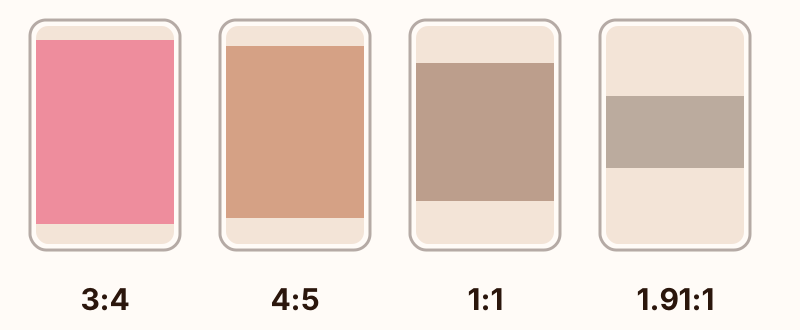
- 3:4 (1080×1440). Tallest in the feed and the shape most phone cameras shoot.
- 4:5 (1080×1350). The safe standard, works everywhere.
- 1:1 (1080×1080). The classic square.
- 1.91:1 (1080×566). Landscape. Wastes vertical space on a phone.
Why carousels win the feed
Three structural advantages, independent of your content:
- Every swipe is engagement. The algorithm reads swipes, pauses and revisits as interest — a 10-slide carousel collects far more micro-signals than a single photo.
- Second chances in the feed. If someone scrolls past your carousel, Instagram can show it again starting from a different slide.
- Saves and sends. Carousels that teach, list or recap get saved for later and sent to friends in DMs. Adam Mosseri has said sends carry more weight than likes when Instagram decides who else sees a post.
Two ways to make a carousel
1. The manual way
Pick 3–20 photos in the Instagram app, set the crop, drag them into order, post. Fine for casual dumps — but every slide is just a raw photo. If you want designed slides (layouts, frames, text, a cohesive look), you need to prepare images in a separate tool first, which is where the real work lives.
2. The AI way
PSTR assembles finished carousel slides from your camera-roll photos automatically — scrapbook layouts, film frames, polaroids, tape, stickers — and exports everything in full resolution, sized for Instagram. You curate the photos; the AI does the layout. See the step-by-step guide or grab free carousel templates.
Carousel formats worth knowing
- Photo dump — loosely themed, candid, anti-perfect. The defining carousel genre of the decade.
- Seamless carousel — one wide image sliced into slides that flow into each other as you swipe. Full tutorial here.
- Recap — a month, a trip, an event in 10–20 slides.
- Tutorial / listicle — one step or item per slide; the save-magnet format.
Need prompts? Browse 20 carousel ideas that actually get engagement.
FAQ
How many photos can an Instagram carousel have?
Up to 20 photos or videos in a single post. Instagram raised the limit from 10 to 20 slides in 2024.
What size should Instagram carousel images be?
1080×1350 (4:5 portrait) is the safe standard and works everywhere. Instagram also accepts 3:4 (1080×1440), which is taller in the feed and matches what most phone cameras shoot. By default the first slide sets the shape for the rest, so decide before you post.
Do carousels perform better than single photos?
Usually, yes. Each swipe counts as engagement, and Instagram can re-show a carousel to the same person with a different starting slide, giving one post multiple chances in the feed.
What's the fastest way to make a carousel?
Pick your photos and let an AI layout tool assemble them. PSTR builds scrapbook-style carousel slides from your camera roll in seconds, then exports full-resolution images ready to post.
More carousel guides
- How to make a carousel post
- Seamless carousel tutorial
- 20 Instagram carousel ideas
- Free carousel templates
Make your first carousel in minutes
The format rewards posting, not planning. Download PSTR free, pick ten photos from your camera roll, and let the AI assemble a carousel you'd actually post.