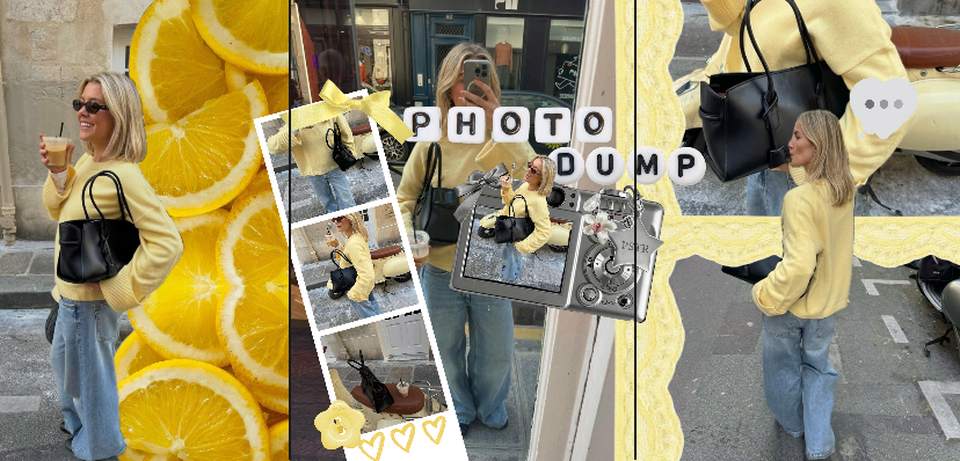
A seamless carousel (also called a split or panorama carousel) is one wide design sliced into slides — so when someone swipes, photos and decorations flow across the slide borders instead of starting over. It's the single biggest "how did they do that" effect in carousel design, and mechanically it's simple.
How it works
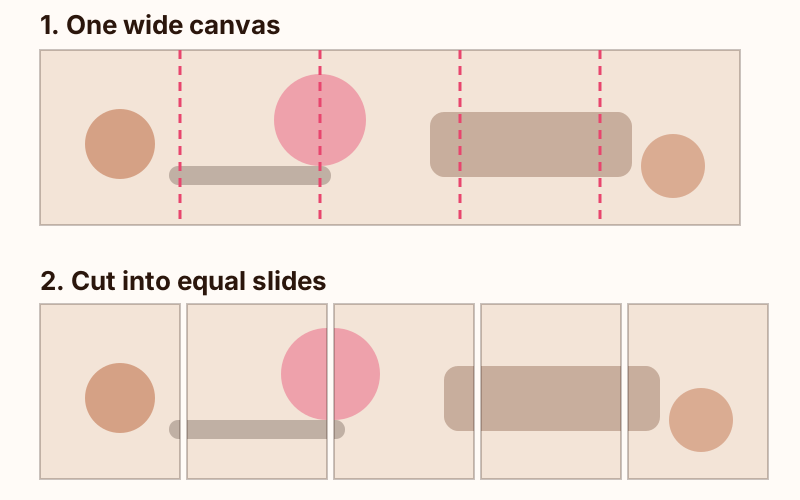
Instagram shows slides edge-to-edge with no gap. If slide 2 ends with the left half of a photo and slide 3 begins with its right half, the eye reads them as one continuous canvas. All you need is a design that's exactly N slides wide, cut into N equal slices.
The math
- Slide size: 1080×1350 (4:5) — or 1080×1080 for square.
- Canvas: N × 1080 wide, same height. Five portrait slides = 5400×1350.
- Slice into equal 1080-wide pieces, export all at identical dimensions, post in order.
The classic mistake is letting one slice come out a pixel narrower — Instagram then scales it differently and the seams jump. Export sizes must match exactly (details on crops in the carousel guide).
Three ways to make one
- Photo editor + manual slicing. Design the wide canvas yourself, slice it with crop tools. Full control, most work, easiest to get misaligned.
- Template with pre-made slices. Faster — grab one from our free templates and drop photos in.
- AI assembly. PSTR lays your photos across one continuous scrapbook canvas — photos crossing borders, tape running through slides — and exports perfectly equal slices automatically. The seamless effect without the pixel math.
What works in seamless format
- Photo dumps with overlap — polaroids scattered across a long table, edges crossing slides.
- Travel routes — a map or road running through the whole carousel.
- Timelines — a year, a relationship, a project left-to-right.
- One wide landscape — the original panorama split, still striking when the photo deserves it.
More formats in 20 carousel ideas.
FAQ
What is a seamless carousel on Instagram?
A carousel where the slides are slices of one continuous wide image, so elements flow across slide borders as you swipe — a photo half on slide 2 and half on slide 3, a line of tape running through the whole post.
What size is a seamless carousel?
Design one canvas that is a multiple of your slide width: for 5 portrait slides, 5400×1350 pixels (5 × 1080×1350). Then slice it into equal 1080-wide slides and post them in order.
Why does my seamless carousel look misaligned?
Two usual causes: slides were exported at slightly different sizes, or Instagram cropped them because the first slide had a different aspect ratio. Export all slices at exactly the same dimensions and post them in order without editing crops.
Can PSTR make seamless carousels?
Yes — PSTR builds seamless scrapbook-style carousels automatically: its AI lays your photos across one continuous canvas and exports perfectly aligned full-resolution slides.
More carousel guides
- Instagram carousel: the complete guide
- How to make a carousel post
- 20 Instagram carousel ideas
- Free carousel templates
Make one without the math
Download PSTR free, pick your photos, choose a seamless layout — the AI handles the canvas, the slicing and the export.